
Saved Blocks
Saved blocks let your users capture a group of blocks — a header, a footer, a product grid, a CTA — and re-insert it into any other template.
The editor owns the whole experience: a save action on every block, a searchable browser with live preview, insert-at-position, rename, and delete. You own storage. Implement a small provider interface against your own API and the feature lights up.
Not the same as custom blocks
Custom blocks are developer-defined block types with their own template and fields. Saved blocks are instances of ordinary blocks that end users save and reuse. The two are independent.
Quick start
The fastest way to try it is the bundled browser-local provider — no backend needed:
import { init, createLocalStorageSavedBlocksProvider } from '@templatical/editor';

const editor = await init({
  container: '#editor',
  savedBlocks: createLocalStorageSavedBlocksProvider(),
});
That stores entries in localStorage under templatical:saved-blocks. Good for demos, prototypes, and single-device use — entries live in one browser profile, don't sync across devices or users, and disappear when site data is cleared. For anything beyond that, supply a custom provider.
Bring your own storage
savedBlocks takes any object implementing SavedBlocksProvider — four members. list is a method; each mutation is either a function or false:
interface SavedBlocksProvider {
  list(params?: { search?: string; category?: string }): Promise<SavedBlock[]>;

  create: false | ((input: SavedBlockInput) => Promise<SavedBlock>);
  update: false | ((id: string, patch: SavedBlockPatch) => Promise<SavedBlock>);
  delete: false | ((id: string) => Promise<void>);
}
Passing false tells the editor the current user may not perform that action, and it hides the affordance.
A minimal REST implementation:
import { init } from '@templatical/editor';
import type { SavedBlocksProvider } from '@templatical/editor';

const json = (res: Response) => {
  if (!res.ok) throw new Error(`Saved blocks request failed: ${res.status}`);
  return res.json();
};

const savedBlocks: SavedBlocksProvider = {
  // Return everything the current user may see — scope it per user, team or
  // account here. The editor calls this with no arguments and filters in the
  // browser.
  list: () => fetch('/api/saved-blocks').then(json),

  create: (input) =>
    fetch('/api/saved-blocks', {
      method: 'POST',
      headers: { 'Content-Type': 'application/json' },
      body: JSON.stringify(input),
    }).then(json),

  update: (id, patch) =>
    fetch(`/api/saved-blocks/${id}`, {
      method: 'PUT',
      headers: { 'Content-Type': 'application/json' },
      body: JSON.stringify(patch),
    }).then(json),

  delete: (id) =>
    fetch(`/api/saved-blocks/${id}`, { method: 'DELETE' }).then((res) => {
      if (!res.ok) throw new Error(`Delete failed: ${res.status}`);
    }),
};

await init({ container: '#editor', savedBlocks });
The data shape
interface SavedBlock {
  id: string;            // assigned by the provider, returned from create()
  name: string;
  content: Block[];      // top-level blocks; a section carries its own children
  category?: string;     // optional — free-text grouping, drives the browser filter
  canUpdate?: boolean;   // optional — absent means allowed; set false to forbid
  canDelete?: boolean;
  createdAt?: string;    // optional — display only, never affects ordering
  updatedAt?: string;
}- The provider owns
id. The editor never generates one; it uses whatevercreate()returns. Scope entries per user, per team, or per account however you like. - Renaming is
update(id, { name }), recategorising isupdate(id, { category }). There are no separate methods;updatetakes a partial patch. - Ordering comes from the provider. The editor renders entries in exactly the order
list()returns and never re-sorts them. Filtering narrows the list without reordering it. Any sorting happens server-side, beforelist()returns. - Filtering happens in the editor. The browser's search box and category filter run in memory over whatever
list()returned.list()accepts a{ search, category }params object, but the editor never sends it — it only arrives if a caller drivesuseSavedBlocksdirectly (see Headless use). Which entries a user may see at all is decided inlist(). - The provider controls who may change what. Pass
falseforcreate,updateordeleteto withhold it, and setcanUpdate/canDeleteon individual entries to carve out exceptions. See Controlling permissions. - Timestamps are display only. Each entry shows a relative "5m ago" label (from
updatedAt, falling back tocreatedAt) with the absolute date on hover. They never affect ordering. Both are optional — omit them and the label is simply not shown.
Controlling permissions
Withhold a whole capability by passing false instead of a function. The editor hides what it can't do — no bookmark action on blocks when create is off (so no save flow at all), no rename control when update is off, no delete control when delete is off.
const savedBlocks: SavedBlocksProvider = {
  list: () => fetch('/api/saved-blocks').then(json),

  // This user may add to the library but never change or remove what's there.
  create: (input) => post('/api/saved-blocks', input),
  update: false,
  delete: false,
};
Withhold a single entry by returning canUpdate / canDelete on it. Absent means allowed — these exist only to forbid, so they're set just on the exceptions. The provider returns them where the answer is already known; the editor never computes its own and never second-guesses the provider.
[
  { "id": "1", "name": "My header", "content": [] },
  { "id": "2", "name": "Team footer", "content": [], "canUpdate": false, "canDelete": false }
]
That renders a library where the user can edit their own entry and only insert the shared one. Note the two levers compose in one direction: canUpdate: true cannot re-enable an update the provider passed as false — the capability wins.
A read-only library
Set all three to false and you get a curated library users browse, preview and insert from but never modify:
const savedBlocks: SavedBlocksProvider = {
  list: () => fetch('/api/saved-blocks').then(json),
  create: false,
  update: false,
  delete: false,
};
Insertion still works, because it only ever touches the canvas — nothing reaches the provider. list is the one member that can't be disabled; without it the feature has nothing to show.
These are UI affordances, not security
Hiding a control stops the editor from offering an action; it doesn't stop a determined caller. Permissions must be enforced server-side as well — the provider methods run in the user's browser.
Error handling
Any method may reject. The editor reports the failure through the editor's onError callback and leaves its in-memory list untouched, so a failed delete doesn't make a block vanish from the UI. The save dialog additionally shows the rejection message inline.
What the user sees
Once a provider is configured:
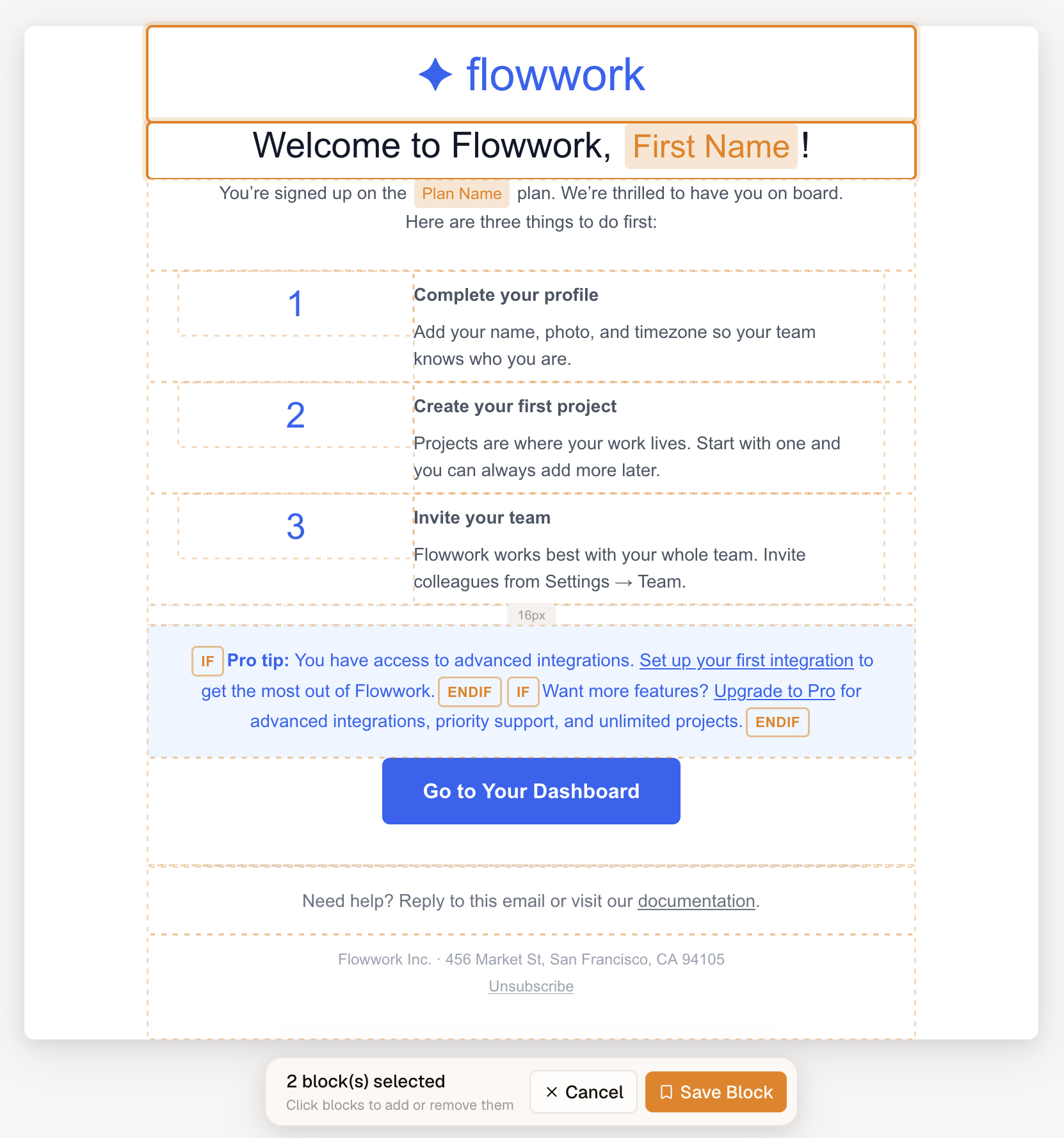
Save — selecting a top-level block reveals a bookmark action in its action bar. Clicking it starts a pick session, with that block already picked.

During a session, plain clicks (no modifier keys) add or remove blocks, and a bar over the canvas shows the count with Save and Cancel. Clicking inside a section picks the whole section — section children aren't individually savable, since a section carries its columns and their contents with it. Escape cancels, Enter confirms.
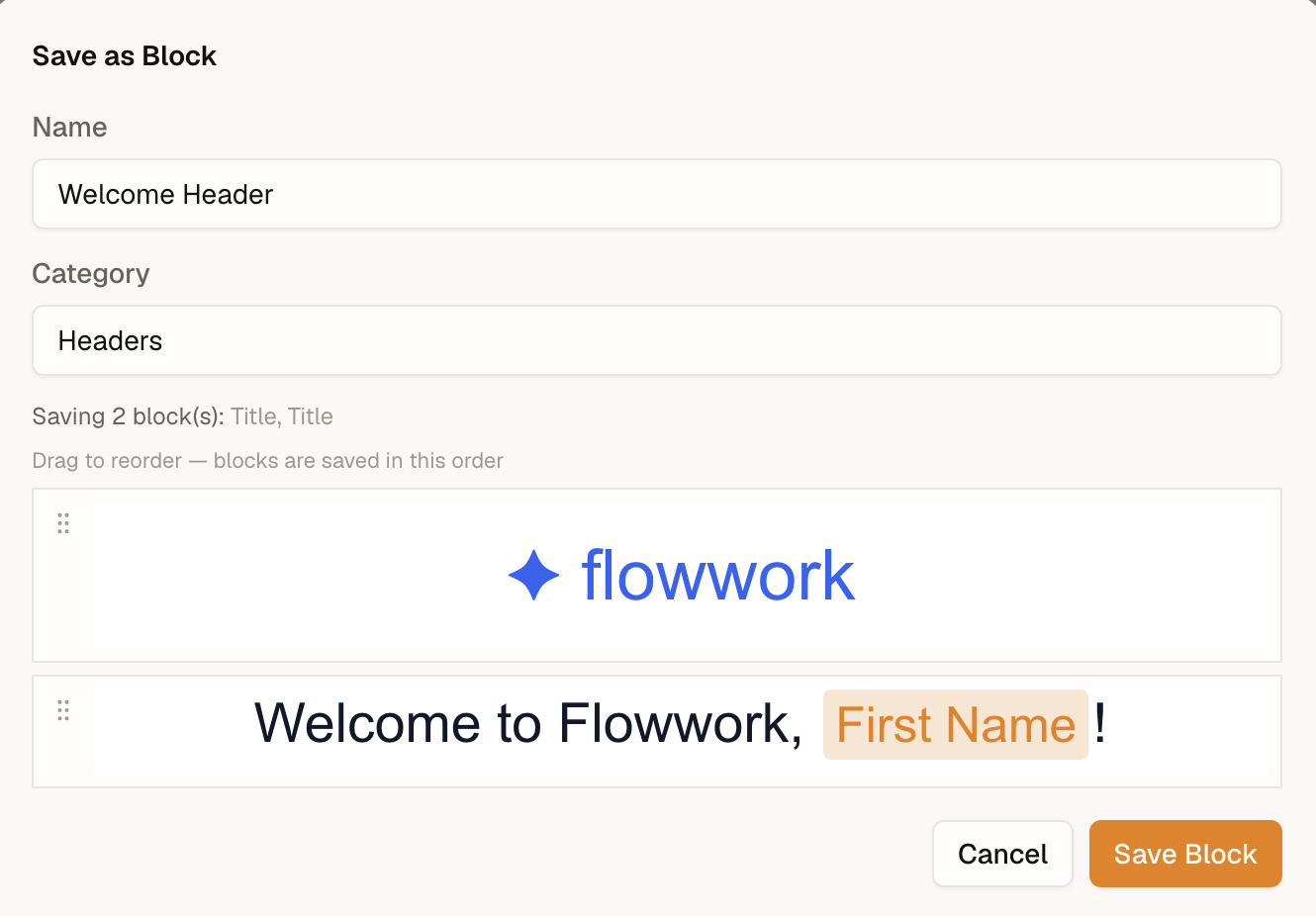
Confirming opens a dialog that asks for a name and an optional category, suggesting the ones already in use. The preview lists the blocks in the order you picked them, and each row has a grip handle to drag it — or Arrow Up / Arrow Down with the handle focused — so you can reorder before saving. Whatever order the list ends in is the order the blocks are stored in.
Browse — a saved-blocks entry sits in the left rail whenever the feature is configured, opening a searchable browser with a live preview. It's there from the first paint whether anything is saved or not, so the rail never shifts, and an empty library opens to a state that explains how to fill it. Nothing is fetched until that browser (or the save dialog) opens —
list()is never called on editor load, and a first open shows placeholder rows until it answers.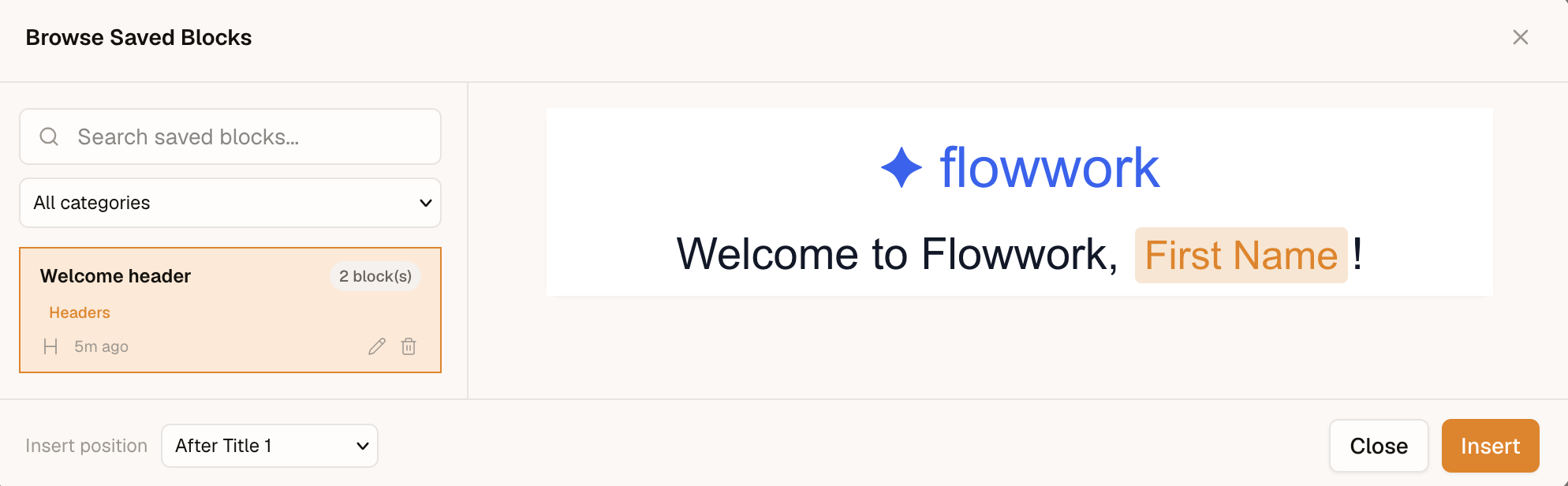
Categorise — a category is free text, flat, and optional; there are no folders and no nesting. The browser shows a category filter as soon as anything is categorised, listing exactly the categories in use — a category exists for as long as some entry carries it. Search and the category filter narrow the list together.
Insert — choose a position (at the beginning, after any existing block, or at the end) and insert. Inserted blocks always get fresh IDs, so inserting the same entry twice never collides.
Rename / recategorise / delete — inline on each row in the browser; the edit row covers both the name and the category, and clearing the category field uncategorises the entry. Delete asks for confirmation first.
Off by default
Omit savedBlocks and the feature is completely absent: no save action, no rail entry, and none of its code is downloaded. The UI is split into lazily-loaded chunks that are fetched only when a dialog is actually opened.
Headless use
The reactive state layer is exported from @templatical/core if you want to build your own UI over a provider:
import { useSavedBlocks } from '@templatical/core';

const {
  savedBlocks, // Ref<SavedBlock[]>
  isLoading,   // Ref<boolean>
  categories,  // ComputedRef<string[]> — distinct categories, sorted
  canCreate,   // ComputedRef<boolean> — did the provider supply create?
  canUpdate,
  canDelete,
  canUpdateBlock, // (block) => boolean — capability AND the entry's own flag
  canDeleteBlock,
  load,        // (params?: { search?, category? }) => Promise<void>
  create,      // (name, content, category?) => Promise<SavedBlock>
  update,      // (id, patch) => Promise<SavedBlock>
  remove,      // (id) => Promise<void>
} = useSavedBlocks({
  provider,
  onError: (error) => {
    /* handle */
  },
});
It keeps the list in sync after each successful call — prepending on create, replacing on update, removing on delete — and re-throws after reporting to onError.
Check canCreate / canUpdateBlock / canDeleteBlock before offering an action in your own UI. Calling a mutation the provider withheld — or one an entry forbids — rejects rather than silently resolving, so a caller can never mistake a refusal for a save.